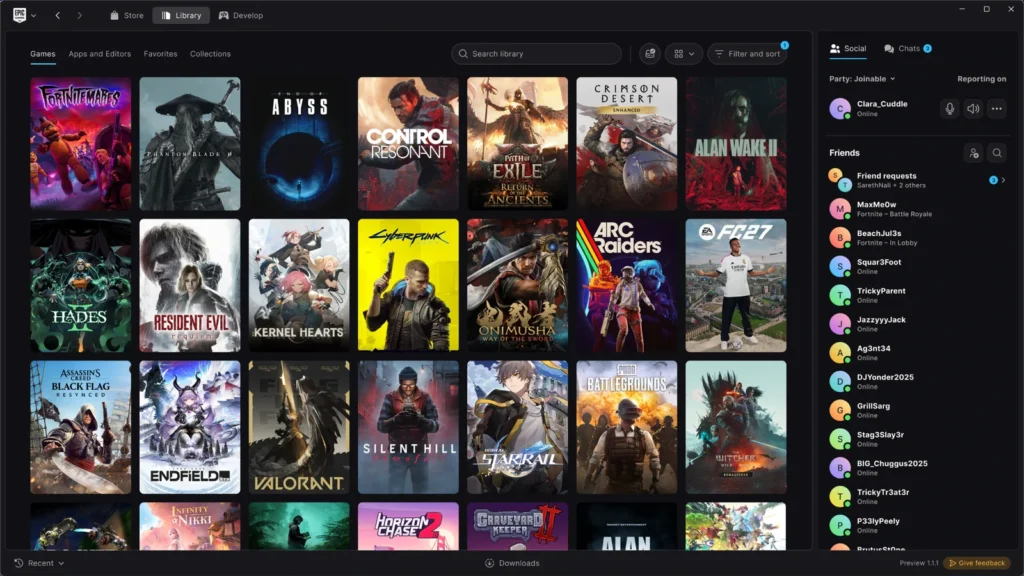
Information checked October 16, 2026. Preview features and support instructions may change.
The new Epic Games Launcher Preview is worth testing only if you are comfortable replacing your existing launcher and dealing with unfinished features. The installer offers to migrate installed games, apps and Unreal Engine projects, then removes the current launcher from that computer. Before switching, note Epic’s rollback warning: uninstalling the Preview also uninstalls previously installed games. Epic says your purchases, cloud saves and account progress carry over, but returning to the stable launcher may require reinstalling game files as well as the old launcher. Epic’s migration instructions
Epic released the Preview on October 14, 2026, for Windows, macOS and Linux. It brings a redesigned library, quicker navigation, improved download details and native Linux launcher support. That last feature does not mean Fortnite is playable on Linux today: Epic is still working on the anti-cheat changes required for that launch. Epic’s announcement | Epic’s Linux anti-cheat update
Should you install the Preview or keep the current launcher?
| Your situation | Recommended choice | Why |
|---|---|---|
| Your installed games and existing setup are working well | Keep the current launcher for now | The Preview replaces the old launcher, and Epic says uninstalling it later also removes installed games. |
| You want the new library and faster interface and can accept bugs | Consider the Preview | These are the improvements Epic is asking players to test. |
| You need to preload a game before its release | Keep the current launcher | Epic confirms game preloading is not supported in the Early Preview. |
| You depend on a trouble-free Fortnite or Rocket League session | Prefer the current launcher until you verify your exact setup | Epic has changed its launch-period messaging about competitive games, while the Preview still lacks some feature parity. Do not mistake an assurance about games that launch successfully for a guarantee about every launcher workflow. |
| You use Linux and expect Fortnite to work immediately | Do not switch for Fortnite yet | A native Linux launcher is available, but Fortnite’s Linux anti-cheat rollout is still future work. |
| You use an Intel Mac | Stay with the existing supported solution | The new macOS Preview requires Apple Silicon. |
These recommendations are based on Epic’s published instructions and may need revisiting as the Preview changes. See the current Preview FAQ, installation support, and Epic’s launch announcement.
Can you preload upcoming games in the Preview?
No. Epic says game preloading is not possible in the Launcher Early Preview. If a release offers preloading and you need to download its files before launch, use the current launcher instead. This is a Preview limitation, not a claim that all Epic Store titles offer preloads. Epic support: preloading limitation
Does installing the Preview remove the old Epic Games Launcher?
Yes, when you migrate from an existing installation. Epic’s setup guide says the new installer offers to move games, applications and Unreal Engine projects before uninstalling the current launcher. That is different from installing a second program and switching between two independent installations whenever you want. Epic support
The migration is designed to avoid downloading your installed games again. Epic warns that the transfer can take time and tells users to leave the migration window open until it finishes. Before switching, finish active downloads, confirm that you can sign in with the account that owns your purchases, and back up important locally stored save files, especially for games without cloud saves. Epic warns that uninstalling a game without cloud saves may also remove progress stored in its installation folder. This is a precaution for the potential later uninstall or rollback, not a claim that Preview installation itself deletes saves.
What happens to your game purchases and saves?
Epic says your purchases, supported cloud saves, installed games and account-based progress should carry over when you migrate to the Preview. That does not establish that every game supports cloud saving or that local-only save files, mods or custom configurations will survive a later uninstall. Check whether the specific game offers cloud saves and keep an independent backup of important local progress. Epic Preview FAQ | Epic’s save-file warning
If the Preview does not recognize an installed game, Epic now documents a scanner: open the Epic menu, select Settings, open Library, then choose Scan for installed games. This is a Preview feature; Epic says the existing launcher does not provide the same automatic detection. Epic installed-game support
Why do Steam and Xbox games appear in the Preview library?
The Preview can detect installed Steam and Xbox games and show them with platform badges. Those entries reflect detected installations, not a transfer of game ownership to your Epic account. If you do not want them displayed, open Epic logo > Settings > Library and turn off Show Steam games or Show Xbox games. Epic confirms hiding those entries does not uninstall the games from their original platforms. Epic support: Steam and Xbox library entries
Can you roll back without losing your installed games?
Not safely by assuming the installer will preserve them. Epic’s current support page says uninstalling the Early Preview also uninstalls all previously installed games. You can return to the regular launcher by uninstalling the Preview and reinstalling the older launcher, but plan for possible game re-downloads and do not assume locally stored game files or modifications will survive. Epic has not published a guaranteed game-preserving rollback procedure in the support material reviewed here. Epic’s rollback warning
If avoiding downloads or protecting local-only saves is important, staying on the existing launcher is the safer choice until Epic provides a documented migration and rollback path that meets your needs.
Does Fortnite work in the new launcher? What about Linux?
There are two separate questions: whether an already-supported game can launch from the Preview, and whether a game is supported on a particular operating system.
Epic’s updated October 14 announcement says supported casual or competitive games can work once successfully launched. However, Epic’s own Preview FAQ has displayed conflicting launch-period advice: one captured version recommends keeping the legacy launcher for competitive Fortnite and Rocket League because integration is still being finalized, while another says competitive play can work after the game starts. Neither statement proves that every Preview sign-in, launch or update workflow is reliable. For tournaments, scheduled competitive sessions or live development work, keep the existing launcher unless you have verified that your exact setup works. This precaution is not a claim that either game is universally blocked on its existing supported platforms. Epic’s changing Preview FAQ | Epic’s updated launch announcement
Fortnite on Linux is not live simply because the launcher now supports Linux. Epic is developing Easy Anti-Cheat Linux v2 and has not announced a Fortnite Linux release date. Epic also says the Steam Deck currently lacks the security features required by its planned EAC v2 solution, although it is discussing possible future support with Valve. Many other Epic Store games are Windows builds and may need a compatibility layer. Native launcher availability alone does not establish game compatibility. Epic anti-cheat roadmap and Steam Deck limitation | Preview FAQ
What system requirements does the Preview have?
Epic’s published minimum requirements are:
| Requirement | Windows | macOS | Linux |
|---|---|---|---|
| Operating system | Windows 10 or 11, 64-bit | macOS 12 or newer | Ubuntu 22.04 LTS+, Fedora 43+, or Debian 12+ |
| CPU | Intel Core i3 or AMD Ryzen 3 | Apple M1 or newer | x86-64 dual-core, 2 GHz or newer |
| Memory | 4 GB | 4 GB | 4 GB |
| Available storage | 700 MB | 200 MB on Preview site; 2 GB in support article | 2 GB on Preview site; 200 MB in support article |
Storage warning: Epic’s two official pages disagree about the macOS and Linux disk-space figures. The Preview website lists 200 MB for macOS and 2 GB for Linux, while Epic’s separate requirements article lists 2 GB for macOS and 200 MB for Linux. Epic has not reconciled those published numbers in the sources checked. Allowing at least 2 GB of free space for the launcher on either platform, plus plenty of space for games, is a conservative planning precaution, not a verified installation minimum.
Setup and online features require internet access. Offline mode is supported only for eligible installed games. Epic says other Linux distributions may work, but they are not officially tested or supported. These requirements concern the launcher, not every game in its library. Epic requirements and FAQ
Is the new launcher really faster than Steam?
Epic advertises a 5.47-second cold start for its new launcher versus 10.07 seconds for Steam in a commissioned comparison. Keywords Studios averaged five tests on 13 machines, excluding the three lowest-end machines tested. However, Valve’s October 13 Steam client update also improved startup performance, so Epic’s comparison should not be presented as a permanent advantage over every current Steam version. Epic’s benchmark disclosure
In a separate October 15 test, PC Gamer reported an average of 5.98 seconds for Epic and 9.32 seconds for Steam across three runs per client on one desktop. That test timed loading the storefront from the system tray, which is not necessarily the same cold-start procedure Epic commissioned. Do not average these results or treat them as a universal speed ranking.
For most players, the more useful changes may be the new searchable library, collections, game-specific pages and a download view that distinguishes download, disk-read and disk-write activity. Those could make routine game management easier even if your own cold-start times differ from Epic’s advertised figures. Epic announcement
Useful Preview settings: downloads, updates and cloud saves
Epic documents more than a visual redesign. Open Epic logo > Settings > Downloads to set download speed limits or turn on scheduled downloads. In the Downloads panel, you can prioritize particular game updates, rearrange the queue and review recently completed transfers. Scheduled downloads are not game preloading: Epic separately confirms that pre-release game preloading is unavailable in the Preview. Epic’s Preview download settings | Preloading limitation
If you rely on cloud saves, confirm the Preview’s toggle under Epic logo > Settings > General > Cloud Saves; Epic says blue means enabled. This setting does not add cloud-save support to games that do not provide it, so retain backups of important local-only saves. You can also check the Preview version under Epic logo > Settings > About > Check now. Epic Cloud Saves settings | Epic version-check instructions
What should you do next?
If your priority is reliability, particularly with a large installed game library or local-only saves, keep the current launcher until the Preview resolves the features you rely on. If you want to help test the rebuilt interface, read the live Preview FAQ, check your operating-system support, finish downloads and confirm your sign-in before running its installer.
Bottom line: This is a substantial new launcher, not just a cosmetic skin. The improved experience may be worth testing, but the return path can remove installed game files, so treat it as a migration rather than a risk-free preview toggle.
Sources
- Epic Games: Launcher Preview announcement
- Epic Games: current Preview FAQ and requirements
- Epic Games: Preview installation, migration and rollback guidance
- Epic Games: save files and uninstalling a game
- Epic Games: Easy Anti-Cheat on Linux
- Valve: Steam client update, October 13, 2026
- PC Gamer: independent launcher performance comparison
- Featured image: Epic Games Launcher Preview screenshot from the official Preview website.