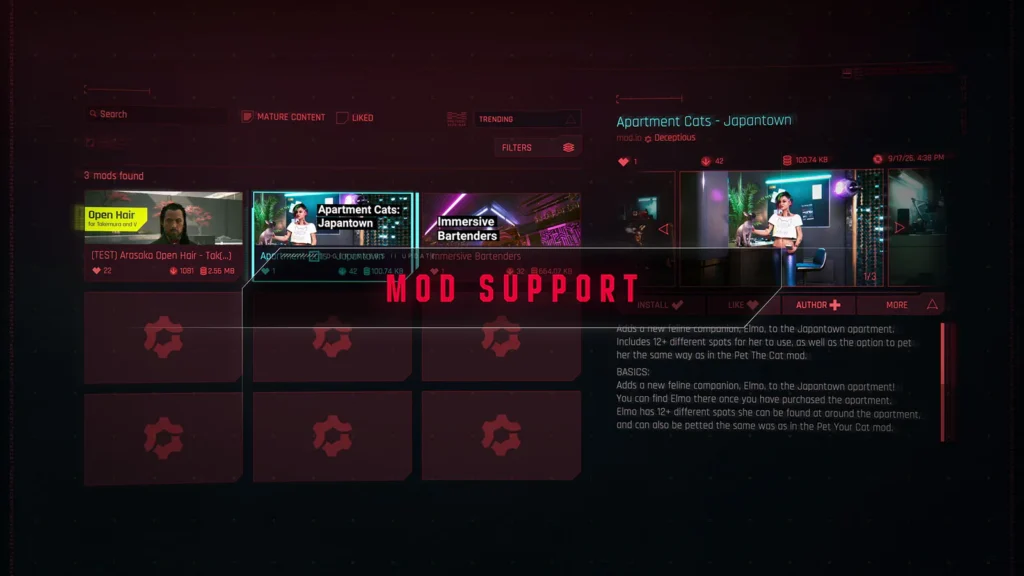
Cyberpunk 2077 Update 2.5’s in-game mods work with cross-progression only when the same mods are enabled on both platforms. On consoles, trophies and achievements are disabled while you play a modded save. If you plan to transfer a save or earn console trophies, check the save marker before installing a mod. CDPR’s mod-support guide.
The in-game menu connects to a selection of mods from mod.io. It does not replace separate PC workflows such as Nexus Mods, Vortex and REDmod. Update 2.5 is also live on Nintendo Switch 2, according to CDPR’s platform-specific update notice.
What is the Update 2.5 Mods menu?
The menu connects Cyberpunk 2077 to a selection of player-created mods hosted through mod.io. To install a mod, open Mods from the main menu, sign in with a CD PROJEKT RED account, connect that account to mod.io, subscribe to the mod, then restart the game. Check the Installed list to confirm the mod is present and enabled. CDPR’s setup instructions.
CDPR describes this as a first step into cross-platform modding. Not every PC mod is in the in-game catalog or available on every platform. A mod’s page has an Available on consoles tag when that mod supports consoles.
Is mod.io replacing Nexus Mods, Vortex or REDmod?
No. CDPR documents the in-game mod.io menu separately from Nexus Mods and Vortex, and continues to provide REDmod tools. These are different mod-installation workflows. A Nexus or Vortex mod does not automatically become an in-game mod.io subscription or a console-compatible mod. Check the instructions and compatibility notes for each mod you use. CDPR’s modding support page.
CDPR’s documentation also says legacy archive-folder mods may continue to load without appearing in the REDmod menu. That does not guarantee a specific third-party mod or framework is compatible with Update 2.5. Check with its creator and update it before loading a save that depends on it.
Can you transfer a modded save between PC and console?
CDPR says you need the same set of mods enabled on both platforms for cross-progression compatibility. If a required mod is missing or incompatible on the receiving platform, the save may not load correctly. Subscriptions sync through your CD PROJEKT RED account, but mods that are unsupported on consoles are ignored there. CDPR’s cross-platform mod guide.
- You use the in-game mod menu: Sign in with the same CD PROJEKT RED account and confirm required mods are installed and enabled on both platforms.
- A mod is installed on PC: Check its page for the Available on consoles tag before expecting it to work on console.
- The receiving platform lacks a required mod: Do not assume the save will load. CDPR warns that missing or incompatible mods can prevent correct loading.
- Cross-progression is not set up: Follow CDPR’s separate cross-progression setup guide. Mod subscriptions syncing is not itself cloud-save setup.
Do mods disable trophies or achievements?
On consoles, CDPR says trophies and achievements are disabled while playing a modded save. A save created while mods are enabled is marked with a mod.io cog icon. Check the icon beside the save on the Load Game screen before continuing a playthrough where you want console trophies. CDPR’s save and trophy guidance.
Some players have recently reported saves appearing marked as modded even though they say they did not install mods, and have asked whether opening or using the menu affects saves. These posts do not confirm a bug, its cause, or how common the issue is. If console trophy eligibility matters to you, keep a separate backup save and check its marker before overwriting or continuing it. This is a precaution, not a confirmed workaround. Example player report.
Can you load a modded save offline?
Yes, if the mods required by the save are already installed on that platform. You cannot install new mods while offline, so a save that needs a missing mod may not load until you reconnect and install it. CDPR’s offline-mod guidance.
What should you do if a mod breaks after Update 2.5?
First, update the mods. CDPR says mod-related problems can include crashes, launch failures, quest progression issues and UI errors, especially after a game update. For in-game mods, disable or unsubscribe from them in the Mods menu and check whether the problem remains. If it began after using a mod, load a save from before that mod was used. CDPR warns that mod effects may remain in save files even after the mod is disabled. CDPR’s troubleshooting guidance.
If you use third-party PC mods installed outside the in-game menu, troubleshoot that setup separately. CDPR’s clean-install recommendation applies to issues caused by external PC mods. It is not the first step for every problem with the in-game mod.io menu.
Before installing Update 2.5 mods, check platform support, decide whether you will transfer the save, and preserve a clean save if console trophies matter. mod.io subscriptions, cross-progression cloud saves and PC mod managers are related, but they are not the same system.
Sources
- CD PROJEKT RED: cross-platform mod support, trophies and offline use
- CD PROJEKT RED: modding support and PC tools
- CD PROJEKT RED: Update 2.5 availability on Nintendo Switch 2
- CD PROJEKT RED: troubleshooting in-game mods
- CD PROJEKT RED: cross-progression setup
- Community report: a player’s modded-save marker question (unverified report)
- Featured image: CD PROJEKT RED’s Update 2.5 Mod Support page. The visible image credit identifies CD PROJEKT RED; this citation does not imply a license or endorsement.