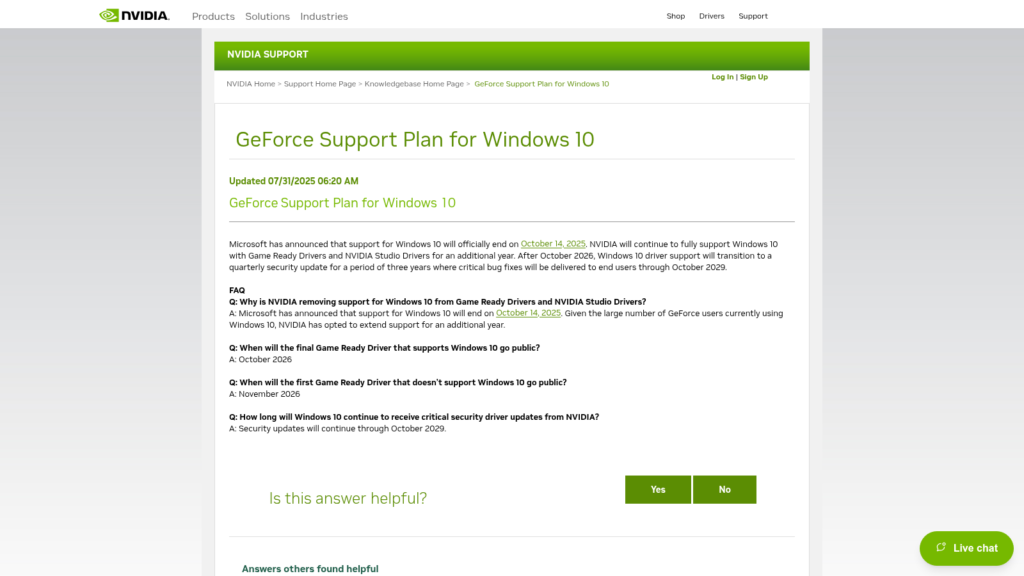
NVIDIA plans to release its final GeForce Game Ready Driver supporting Windows 10 in October 2026. Starting in November, new Game Ready releases will move on without Windows 10 support.
That does not mean your GeForce card stops working in November, and it does not mean every game installed on Windows 10 suddenly becomes unplayable. The change is about future mainstream driver support: new-game optimizations, ordinary driver bug fixes, new features and the regular Game Ready release cadence.
NVIDIA will still provide quarterly critical-security driver updates for supported Windows 10 GeForce systems through October 2029. But that security-only path is not the same thing as staying on the current Game Ready branch.
When does NVIDIA end Windows 10 Game Ready support?
NVIDIA’s official GeForce Support Plan for Windows 10 gives three important milestones:
- October 2026: the final planned Game Ready Driver and NVIDIA Studio Driver supporting Windows 10
- November 2026: the first planned Game Ready Driver that does not support Windows 10
- Through October 2029: quarterly critical-security driver updates for Windows 10
As of this article’s preparation, NVIDIA has identified the month but has not named a specific October driver version as the final Windows 10 Game Ready release. That matters because gamers should not guess that an existing September driver is automatically the last one.
Will your NVIDIA GPU stop working after October?
No.
The driver already installed on your Windows 10 PC does not expire because NVIDIA publishes a newer Windows 11-only branch. Games that work correctly today should not suddenly stop simply because the support calendar moves into November.
The risk grows over time instead. A new game released later may need a driver-side fix, profile, optimization or graphics-feature update that NVIDIA only ships through the newer Game Ready branch. A future game can still work on the final Windows 10 driver, but NVIDIA’s policy no longer promises the normal stream of game-specific improvements for that operating system.
What does Windows 10 lose after the final Game Ready driver?
The important loss is the normal mainstream driver lifecycle.
Game Ready Drivers are where NVIDIA commonly delivers support for new games, performance tuning, driver-level bug fixes, compatibility changes and newer graphics features. After Windows 10 leaves that branch, gamers should not treat the quarterly security packages as substitutes for those releases.
A security update may fix a critical driver vulnerability. It is not a promise to add a profile for a new game, resolve an ordinary rendering bug, improve performance in a new release or add support for a new graphics feature.
Does NVIDIA still support Windows 10 through 2029?
Only in a narrower sense.
NVIDIA says Windows 10 will receive quarterly critical-security driver updates through October 2029. That is valuable, but saying simply “NVIDIA supports Windows 10 until 2029” can be misleading because full Game Ready and Studio support ends much earlier.
The more accurate description is:
- full Game Ready/Studio support through the final October 2026 release
- security-focused Windows 10 driver maintenance after that
- planned security-driver end in October 2029
Windows 10 support and GPU architecture support are different clocks
This is the most important distinction for older GeForce owners.
NVIDIA separately ended normal Game Ready support for Maxwell, Pascal and Volta GeForce architectures in October 2025. Its architecture support plan says those GPUs receive only critical security updates through October 2028.
So there are two independent lifecycle limits:
- the operating system can stop receiving normal Game Ready releases
- the GPU architecture itself can stop receiving normal Game Ready releases
Whichever restriction applies to your setup matters.
What about GTX 10, GTX 900 and older cards?
If you use a Pascal, Maxwell or Volta GPU, moving from Windows 10 to Windows 11 does not restore normal Game Ready support.
Those architectures already moved to their security-maintenance track in 2025. Their architecture-specific critical-security window runs through October 2028, which is shorter than NVIDIA’s general Windows 10 security-driver window through October 2029.
This is why the operating-system cutoff should not be confused with the separate legacy-GPU policy.
That older-GPU security-driver question is separate from the Windows 10 cutoff affecting the otherwise-current GeForce driver branch. For the September 2026 legacy-GPU update, see our NVIDIA 582.78 security-driver guide.
What about RTX 20, 30, 40 and 50 Series cards?
These newer GeForce families are the clearest example of Windows 10 becoming the limiting factor.
NVIDIA’s architecture policy keeps Turing, Ampere, Ada and Blackwell on the normal Game Ready track, but a PC that remains on Windows 10 will stop receiving the regular Windows 10 Game Ready branch after the final October 2026 release.
In practical terms, an RTX card can remain fully supported as a GPU architecture while the operating system prevents that PC from following NVIDIA’s newest mainstream Windows driver releases.
Should Windows 10 gamers upgrade to Windows 11 now?
If your PC officially supports Windows 11 and you regularly play new releases, moving before the November driver transition is the most straightforward way to remain on NVIDIA’s normal Game Ready branch.
That does not mean every Windows 10 gamer needs to upgrade on the same day. Staying on Windows 10 can still make sense temporarily if you depend on older software or hardware, are troubleshooting a compatibility problem, or mainly play an established game library that already works correctly.
The trade-off is that from November onward you should expect the gap between the frozen mainstream Windows 10 driver and current Windows 11 Game Ready releases to grow.
Should you replace your GPU because of the Windows 10 cutoff?
Not solely because of this policy.
If you have an RTX card that still meets your performance needs, the operating system is the immediate lifecycle issue, not necessarily the GPU. Moving to Windows 11 can keep a supported RTX architecture on NVIDIA’s current Game Ready path.
If you use an older Maxwell, Pascal or Volta GPU, the decision is different because the GPU itself is already on security-only support regardless of whether the PC runs Windows 10 or Windows 11.
For a current-generation upgrade decision, IGZ’s RTX 3060 upgrade guide focuses on performance needs rather than treating support deadlines alone as a reason to replace working hardware.
What happens to Windows 10 itself?
NVIDIA’s driver policy does not extend Microsoft’s Windows lifecycle.
Microsoft ended standard support for Windows 10 version 22H2 on October 14, 2025. Microsoft now provides separate Extended Security Updates paths for eligible systems. Its current consumer guidance says enrolled Windows 10 PCs can receive critical security protection through October 12, 2027.
Those Windows security updates and NVIDIA’s driver-security updates solve different problems. Receiving one does not automatically provide the other.
A Windows 10 gaming PC can therefore have several separate support clocks at once:
- Microsoft’s Windows operating-system security lifecycle
- NVIDIA’s Windows 10 graphics-driver lifecycle
- NVIDIA’s architecture lifecycle for the specific GPU
- the individual game’s own Windows and GPU requirements
What should you do before the final Windows 10 Game Ready driver?
- check whether your PC is actually running Windows 10 or Windows 11
- identify your exact GeForce GPU architecture
- keep your current supported NVIDIA driver updated
- do not label a driver as the “last Windows 10 driver” until NVIDIA confirms it
- if your PC officially supports Windows 11 and you want continuing new-game driver support, plan the migration rather than waiting for a game-specific problem
- if you stay on Windows 10, continue installing NVIDIA’s supported security packages when they become available
- keep Windows itself on an appropriate Microsoft-supported or ESU path where eligible
What IGZ will recheck
IGZ will update this article when NVIDIA publishes the actual final Windows 10-compatible Game Ready Driver and again when the first Windows 11-only Game Ready release arrives.
We will also watch for any change to NVIDIA’s October 2029 Windows 10 security timeline or its separate October 2028 Maxwell/Pascal/Volta security horizon.
The key takeaway is that Windows 10 does not make your GeForce GPU stop working in November 2026. What changes is your access to NVIDIA’s continuing mainstream gaming-driver branch. For gamers who want ongoing new-release optimizations and ordinary driver fixes, Windows 11 increasingly becomes the supported path.